Saturday, June 1, 2024

A STEM Project: A Paper Microscope with One and Two Lens

A Paper Microscope with One and Two Lenses

Components of a Paper Microscope

A One Lens Eyepiece and a Two Lens Eyepiece with a Spacer Tube for the Objective Lens, A Magnetic Base for the Microscope and a Specimen Slide which Attaches with a Magnet


In a previous blog posting https://papercraftetc.blogspot.com/2024/05/a-stem-project-making-simple-paper.html, I coded an entire paper microscope using a glass marble as the lens in TurtleStitch and I explained the steps that were required to program the design. In this blog posting, I will replace the glass marble with one lens on the eyepiece tube and then construct another eyepiece tube for two converging lenses. The eyepiece tube will be held upright with two supporting structures. I also modified the base of the microscope to include magnets so that the specimen slide and the microscope base will be automatically aligned when the corresponding magnets are placed together. I got the idea of using magnets for the specimen slide from Foldscope, https://foldscope.com I thought it was ingenious that they used a magnet to align the lens and the specimen slide together.

My focus of building this paper microscope is to give the building blocks necessary to create a microscope  for different lenses of various focal lengths.  While I am giving you values for my particular lens, I am supplying the TurtleStitch code to modify the lengths of the components, so that you can create your own microscope to your particular needs.

A one lens microscope is called a simple microscope. It is similar to a magnifying glass. A two lens microscope uses two lenses to compound or multiply the level of magnification. The first microscopes were made by putting two or three magnifying glasses together.


TurtleStitch Code

Here is the TurtleStitch code for the components of a microscope with one lens. https://www.turtlestitch.org/run#cloud:Username=Elaine&ProjectName=Components%20For%20a%20Microscope%20With%20One%20Lens

Here is the TurtleStitch code for the components of a microscope with two lenses. https://www.turtlestitch.org/run#cloud:Username=Elaine&ProjectName=Components%20For%20a%20Microscope%20With%20Two%20Lens

Here is the TurtleStitch code for the microscope base and support beams. https://www.turtlestitch.org/run#cloud:Username=Elaine&ProjectName=Microscope%20Support%20Beams%20and%20Base

Here is the TurtleStitch code for the microscope box.

Here is the TurtleStitch code for the specimen slide.

Types of Lens Used

The three lens that I used are from Thor Labs, https://www.thorlabs.com I used a 12.7 mm lens with a focal point of 50 mm (Thor Labs - AC127-050-A) for the eyepiece of the single lens microscope.

For the double lens microscope, I used a 12.7 mm convex lens with a focal point of 50 mm for the eyepiece (Thor Labs -  LB1844) and a 12.7 mm convex lens with a focal point of 25 mm for the objective (Thor Labs - LB1844) which is the lens that you place next to the specimen. The focal length of the eyepiece lens is about 160 millimeters or 6.29 inches. The focal length of the objective lens is about 25 millimeters or about .984 inches.


Microscope Cutting Files

Here are the files to make the paper microscope.  I have three versions of the files.  The first is a PDF where you can cut out the pieces with scissors.  The second file is for the Silhouette and the third file is all other electronic paper cutting machines. 

Materials needed. - Glue Dots, three lenses as explained previously, magnet paper and a tea light

Here is the PDF. It is recommended to use 65 lb black cardstock because a dark background allows for more contrast which will allow you to see your specimens better. (I used white cardstock for design purposes only.)

Here is the .Studio file for the Silhouette.

Here is the SVG. The file goes beyond the viewable area.  Zoom out to see the entire file.


Make the Box   -  Only one box is necessary to make the microscope with one lens or two lenses because the telescoping eyepiece tube design is the only thing that is replaced with the new lens and a lens spacer.

Crease the box top as shown above and apply glue to the two tabs on the sides. Repeat for the other side of the box. Insert the tea light into the bottom of the box and affix it with a Glue Dot (not shown).  I recommend offsetting the tea light a little from center because you do not want direct light when viewing a specimen.  Close the box with the tea light inside.

Make the Specimen Holder

Crease the specimen slide and apply Glue Dots to the two tabs of the specimen slide to adhere them together.

Make the Eyepiece Tubes - Three tubes will be made, two eyepieces tubes and an eyepiece support tube.

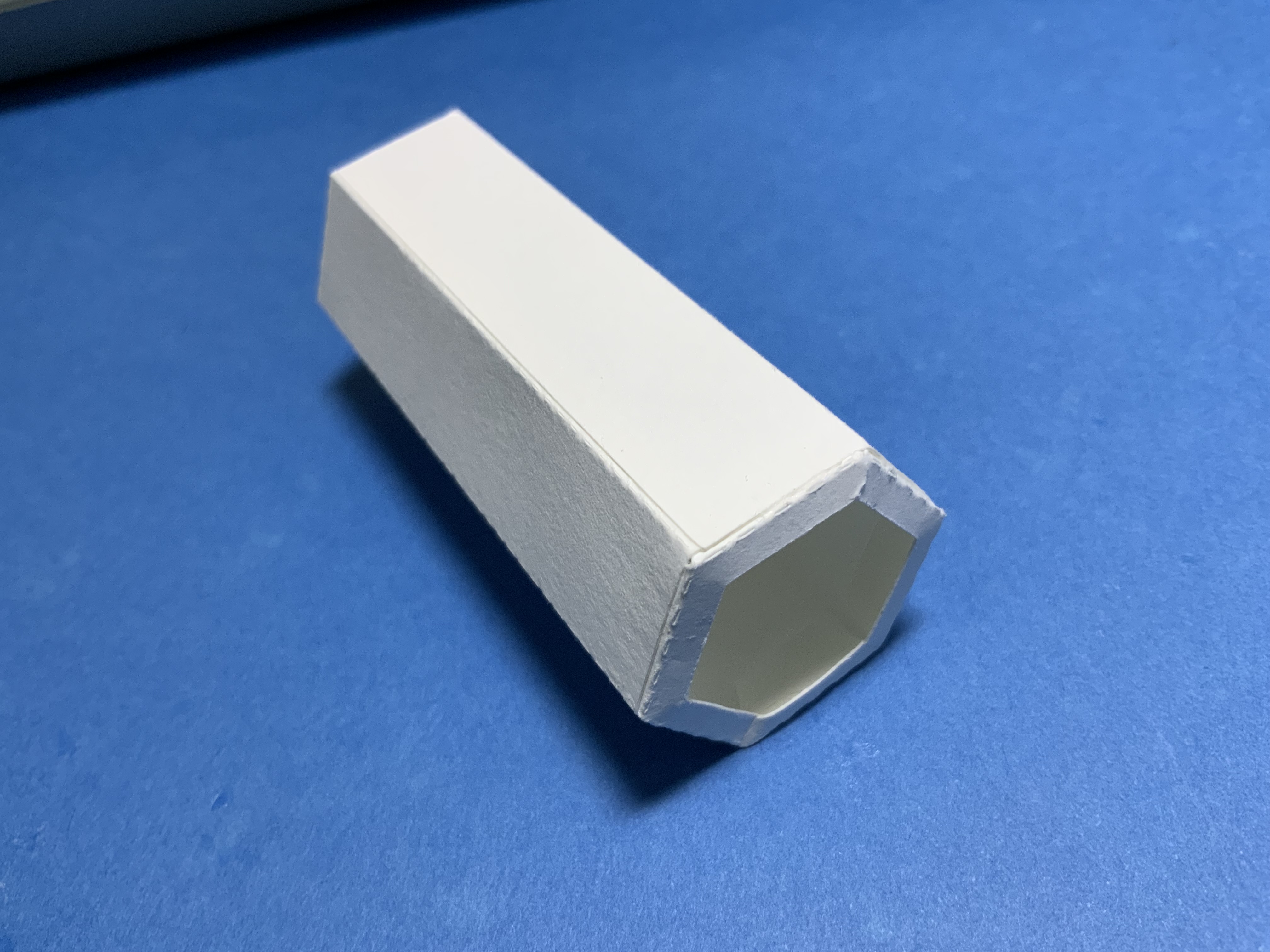
Crease the hexagonal eyepiece tubes. Apply glue to the eyepiece tube and the eyepiece support tube at the tabs. Precision gluing is required so that the tubes will telescope.

The eyepiece tube can be folded flat so that the glue will adhere properly. (Shown in the photo above on the left.)  Do not leave it in this position for too long as glue might have entered the center of the tube and adhere it together. Once each tab has adhered, make the tubes into a hexagonal tube.

Place each eyepiece tube into the eyepiece support tube.  Slide the shorter tube back and forth at least twenty times to make sure that the tubes will telescope properly. Test for the second eyepiece tube.


Apply glue to two lens holders on the six tabs and insert it into each side of the eyepiece tube. Repeat for the second eyepiece tube.

The ends of the eyepiece tubes will look as shown above.


Make the Lens Holders For All Three Lenses - One for the 'One Lens Microscope' and two for the eyepiece and objective lens of the 'Two Lens Microscope'

Crease the two lens holder strips into a circle that are two different sizes - one longer than the other.
Apply glue to the two tabs and adhere at the dotted line on the strip.

Glue the lens holder strip onto the lens circle. Try to center the lens holder strip on the circle. Repeat for the other side.
Insert the lens into the smaller side. Apply glue to the inner edge of the smaller side.

Adhere the two sides together. Write the lens value on the lens circle so that the lens do not get mixed up.  Repeat for the other two lens. 


Assemble the Eyepiece Tube for the 'One Lens Microscope'

For the one lens microscope, apply glue to the top of the lens circle.

Adhere it to the lens holder of the eyepiece tube. 

Assemble the Eyepiece Tube for the 'Two Lens Microscope'

For the two lens microscope, apply glue to the top of the eyepiece lens circle.

Adhere the eyepiece lens to the top of the eyepiece tube.

Make the spacer for the objective lens by creasing the spacer into a circle, applying glue to the tab and adhering the tab.
Glue the lens circle to the bottom of the spacer.

Apply glue to the top of the spacer as shown.

Adhere the objective lens to the spacer.

Glue the spacer to the eyepiece assembly which has the corresponding eyepiece lens as shown above.
Please notice the placement of the two lenses as this is a fixed length.


Make the Support Beams for the Base of the Microscope

Crease the support beams and apply glue as shown above.

Fold the beams into two triangles.  Apply glue to one side of the triangle as shown above and adhere it together.  A square beam is then formed. Repeat for the second beam.

Insert the tabs of the beams into the base.

Glue the tabs to the base as shown above.

Apply glue to the side of the beams facing one another. 

Adhere the eyepiece support tube to the sides of the beams.

Add Magnets to the Base of the Microscope and the Specimen Slide

Apply glue to the four corners of the microscope base. Adhere magnet pairs (eight magnets are used) to each of the four corners. A magnet pair is two magnets which are attracted to one another and are attached. I recommend orienting all of the magnet pairs in the same direction of magnetism before gluing.

Apply glue to these four magnet pairs and adhere them to the box base.  Allow the glue to dry.  When the glue is dry, four magnets will be attached to the microscope base and four magnets will be attached to the box base. 

Align the specimen template to the specimen holder. Two magnet pairs (four magnets) need to be glued
 to the left and right squares in the template. Apply glue to the two magnet pairs. Adhere this specimen slide with the magnets to the bottom of the microscope base by centering the square and round holes.  Once the glue is dry, remove the template and throw it away.  It is no longer needed. 

The placement of the twelve magnets should look as above.

Turn on the tea light and add a specimen to the specimen holder. 

Attach the specimen slide to the microscope base aligning the magnets.

Align the magnets on the four corners of the microscope base to the box base.


Using the 'One Lens Microscope'


Slide the eyepiece tube into the eyepiece support tube with the lens oriented to the bottom of the tube. 

The specimen is now ready to be observed by sliding the eyepiece tube up and down until the specimen is clearly in view.

Calculations for the 'One Lens Microscope' for a achromat lens with a 50 mm focal length

-Image Distance to Lens


Magnification


A Graph of Magnification Sensitivity
The graphics shows that at a distance from the specimen to the lens of 50.8 mm (approximately two inches), the specimen is in focus.


Using the 'Two Lens Microscope'


 Slide the eyepiece tube into the eyepiece support tube with the eyepiece lens oriented on the top and the objective lens with a spacer at the bottom.

The specimen is now ready to be observed by sliding the eyepiece tube to the bottom of the eyepiece support tube.  The length of the focal point is fixed when using the two lens. I found that it was difficult to get the specimen aligned in the microscope for viewing.  I flipped over the specimen slide so that the magnets did not attract.  I was then able to focus the specimen. 


Calculations for the 'Two Lens Microscope' with Two Converging Convex Lens 

Eyepiece Focal Length is 50mm - Objective Lens is 25 mm

-Image Distance from the objective lens to the specimen is 40 mm 


Total Magnification


Conclusion

I liked the one lens microscope better because the specimen was easier to view and to focus.  The  specimen on a two lens microscope was hard to see because the lengths of the lens are set on the eyepiece due to the calculations of the lens formula. Since everyone's eyesight is different, it is hard to fine tune the image when the distances are fixed.


Tuesday, May 21, 2024

A STEM Project: Camera Obscura - A Pinhole Camera

This camera obscura allows light to go through a small 1 mm pinhole opening. The light is projected on the other side of the box on a piece of vellum. The projected image is upside down. Four boxes of 65 lb. black cardstock of varying depths...1, 1 1/2, 2 and 2 1/2 inches with a pinhole are to be made.  The lid of the box is made out of vellum.

Here is the PDF.  

Here is the .Studio file.

Please check to see if the pinhole is cut properly. There might be a hanging chad that needs to be removed by poking it with a pin.  All of the pinholes are the same size in each of the boxes.

 I used a six LED bulb clip-on light as the light source.  I colored two small squares of plastic wrap.  Each plastic square covered two of the six LED bulbs.  I used a dark pink and blue permanent marker.  I did try other colors but they were too faint.  I taped the blue square to the upper portion of the light and the pink square to the lower portion of the light.  I left the middle two LED bulbs clear.
Place the boxes in a straight line and a ruler parallel to the boxes as shown above. Moving the light so that it is parallel to the largest box, I observed that the image that is portrayed in the velum has the colors reversed.  I continued to do the same for the remaining boxes. Images shown below.
2 1/2 inch depth
2 inch depth
 1 1/2 inch depth
1 inch depth

Conclusion: 

If the distance between the pinhole and velum is reduced, the size of the image will decrease and the image will become brighter since the light spreads over a small area. If the distance between the pinhole and velum is increased, the image size will increase and the image however will get less bright since the light spreads over a large areaThere were six LED bulbs in the lamp.  Only four lights were clearly visible, the other two lights were faint as they were out of range.


A STEM Project: Making a Simple Paper Microscope Using a Glass Marble Coded in TurtleStitch


Simple Components of a Marble Microscope
Eyepiece tube, a specimen slide and a glass marble lens

Simple Microscope Assembly Using a Glass Marble

In a previous blog posting, I created a simple microscope using a clear glass marble from the Dollar store. I designed and coded parts of the microscope in TurtleStitch. https://papercraftetc.blogspot.com/2024/04/a-stem-project-making-simple-microscope.html 

In this posting, I coded the entire microscope design in TurtleStitch and I will explain the steps that were required to program the design. 

Coding a Three Dimensional Design in TurtleStitch To Be Cut and Joined in Paper

Coding a three dimensional object appears at first to be a daunting task because of the third dimension. It is easy to code a square in two dimensions but how do you code a square box with a top that slides into the  bottom? It is best to examine a square box like this and look at its structure. How was it made? Each side of the box needs to be coded.  Squares are easy to code and then the joining of the sides needs to be taken into account. 

To create a simple square box, all the side lengths will be the same. The square that is in the middle of the above figure needs to be dashed lines because solid lines are cut lines and dashed lines are fold lines.
When the inner square is changed to dashed lines, the image should look like this.

The only thing that is left to do is to make tabs for the box. The tabs are needed so that the corners of the box can be joined at this location with glue.  I like to make my tabs from .25 to .5 inches wide depending on how big the box will be.  


Two tabs are joined at the sides of the squares in the upper and lower squares. 

For the simple microscope box, the sides of the box need to be shorter. In the example above, the four outer squares were adjusted to the same height to make the box with a shorter height. 

The design is now ready to be coded in TurtleStitch. This design is called a net because it is a design which can be cut and folded to create a solid shape.

When designing in paper,  the size of the object must be taken into account because of the constraints of  the medium.  Paper comes in different sizes, usually 8 1/2 x 11 inches. The above photo shows another variation of a box. This box had to be made differently because the top of the box is bigger. The sides are cut separately and then are attached to the top of the box. 


Basic Building Blocks in TurtleStitch 

There are some basic building blocks that are needed to code a three dimensional design in paper. A 3D design requires tabs and folds to join the different paper parts together. They are an edgefold block, a dashed line block and a one inch block.


Edgefold Block

The edgefold block is used to create a tab strip for gluing parts together. The tabbed strip can be made with three variations of teeth - rectangular, trapezoidal or triangular teeth and a variable number of teeth.

https://www.turtlestitch.org/users/Elaine/projects/Edgefold%20Block


In the example shown above, a 2.5 inch x .5 inch strip is created with eight trapezoidal shaped teeth spanning the strip with the orientation of the teeth going downward.


Dashed line Block

The dashed line block is used to create a fold line for bending the paper at the tabs.

https://www.turtlestitch.org/run#cloud:Username=Elaine&ProjectName=Dashed%20Line%20Block

In the example shown above, a 1 inch dashed line is created with 5 dashes per inch.


One inch Block

A one inch block is necessary to convert the design to the correct size when it is cut using an electronic paper cutting machine as the size is not preserved in the export process. This file should be exported as a DXF file in TurtleStitch.  It should then be resized in the electronic paper cutting software using the one inch block as reference. 

https://www.turtlestitch.org/run#cloud:Username=Elaine&ProjectName=One%20Inch%20Block


The one inch block is used for reference once the file has been opened with the electronic paper cutting software to be cut. The one inch block needs to be moved away from the design by placing a value in steps to inches block.


Please Note: I have consolidated all of these blocks into one TurtleStitch program called "Basic Components of 3D Papercrafting". 

https://www.turtlestitch.org/users/Elaine/projects/Basic%20Components%20of%203D%20Papercrafting


Here are the three links to the TurtleStitch code for the Simple Microscope.

1). Simple Microscope Box 

https://www.turtlestitch.org/run#cloud:Username=Elaine&ProjectName=A%20Simple%20Microscope%20Box

2). Simple Microscope Components 


3). Specimen Slide   


Coding the Simple Microscope Box 

The microscope box is a square box with four sides that are attached with four tabs.

The top and bottom of the box are similar. The difference between them is that the bottom is 98 % smaller than the top of the box.  This allows for the box to slide into one another easily.


I created some custom blocks for the box because I wanted to simplify my code.

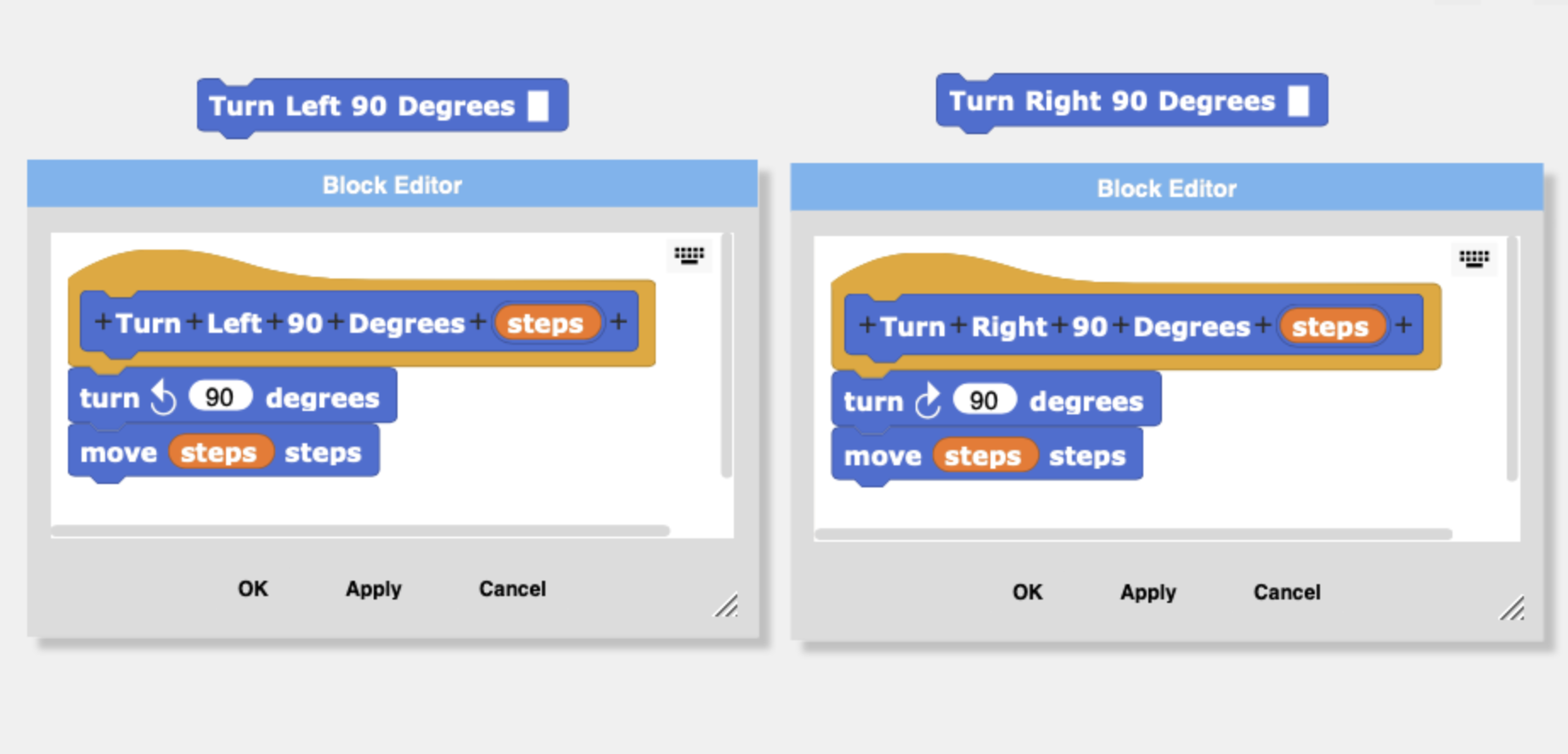
The blocks that I created are the Turn Left 90 Degrees and Turn Right 90 Degrees blocks. I combined a turn and move in each of these blocks. Using these blocks will cut coding down by 50% when these blocks are used. 


The two sided edgefold block creates the side of the box and two tabs.


I also created a Box block which contains the code which creates the top of the box. To create the bottom of the box. The 'side' value is set to 98% of the top's value. 

Calculate the center of the box to put a hole in it for the microscope light.


Once the box top is made, a hole is placed in the center by using the following calculations.

size of the side/2 = center point of square box

Once at the center of the box is determined, the radius of the circle needs to be subtracted to put the turtle in the correct position to construct the circle. The turtle needs to be pointing upward to construct the circle.


Image of the box top and bottom (one inch square not shown) that were created in TurtleStitch.


Coding the Simple Microscope Components

Eyepiece tube (red) and the lens holder strips (blue) are coded like the Simple Microscope Box with the same blocks - edgefold, dashed lines, turn right and turn left blocks 

The coding of the lens holder requires trigonometry to calculate the inner hexagon's side length.


The outer hexagon is made with the 'dash line' block and the 'edgefold' block using the hexagon length value of 0.555 inches.


To find the inner hexagon side length,
The side length of the inner hexagon is equal to the outer hexagon side length minus two times the opposite side of the triangle.

Find the hypotenuse.
And then the opposite side length of the triangle to move the turtle the inner side length distance.


Here is the code that calculates the hypotenuse and the inner side length of the hexagon.


The circle measurement for the lens circles were measured from the glass marble.  The outer circle is approximately 0.45 inches and the inner circle is half of that measurement. The coding of the placement of the circles inside of one another is the same concept of the circle placed in the center of the box.


Coding the Specimen Slide

The specimen slide looks complicated to code but it is easy to see that only half of the slide needs to be coded because the image is mirrored.

The next thing to look at before coding is the shapes that make up the design. The circular cutouts are semicircles which are easy to code using the Arcright or Arcleft blocks. The rest of the design is right angles which are simple to code.

I did add a special feature in my Specimen Slide block code.  I added a variable called 'scale'. I wanted to be able to vary the size of the specimen slide without changing my code. 

To scale a design, the scale variable needs to be multiplied by the value of the movement of the turtle. The scale value must be multiplied each time a move is made.  This is a tedious task if the scale value is added after the code has been made.  It is a good idea to think about scaling before any code is written.

The design can be scaled in the electronic paper cutting software but it is nice to have the ability to code it.  It is not always easy to get exact sizes in the electronic paper cutting software. 

 
Directions to Cut the Box with the Silhouette or other any other electronic paper cutting machine.

Export the TurtleStich design as a DXF file.

The DXF file is then opened in the Silhouette software. The size of the one inch square is observed. The size of the entire file needs to be resized as the size is not preserved from one application to the other.  Divide 1 by the size of the observed one inch square and then multiply by 100. Transform the entire file with the calculated percentage amount.  Check the one inch square to see if it is now one inch.  (The one inch square is no longer needed, and it can now be deleted.)

Simple Microscope Cutting Files

Here are the files to make the simple paper microscope.  I have three versions of the files.  The first is a PDF where you can cut out the pieces with scissors.  The second file is for the Silhouette and the third file is all other electronic paper cutting machines. 

Materials needed. - Glue Dots, Glass Marble and a Tea Light

Here is the PDF. I used 65 lb cardstock.

Here is the .Studio file for the Silhouette.

Here is the SVG. The file goes beyond the viewable area.  Zoom out to see the entire file.
Make the Box 
Crease the box top as shown above and apply glue to the two tabs on the sides. Repeat for the other side of the box. Insert the tea light into the box and affix it with a Glue Dot (not shown).

Apply Glue Dots to the two tabs of the specimen slide.

Make the Eyepiece Tube

Crease the tube and apply glue to the side tab.  Shape into a hexagonal tube. 
Apply glue to the lens holder on the six tabs. 

Insert the lens holder into the eyepiece tube.

Make the Lens Holder

Crease the two lens holder strips into a circle.
Apply glue to the two tabs and adhere.

Glue the lens holder strip onto the lens circle. Repeat for the second one.

Insert the glass marble into the smaller side. Apply glue to the top edge of the larger side.

Adhere the two sides together.

Assemble the Viewing Platform


Insert the specimen into the specimen slide.

Assemble the simple microscope by placing the specimen slide on top of the lite box and then align the eyepiece tube in the center of the specimen slide to view the specimen.